Mozilla Firefox: Development Specifics
Overview
This document discusses specifics related to Mozilla's Firefox development model.
Discussion should take place on dev-planning and changes should be submitted as pull requests on GitHub.
Main Repositories
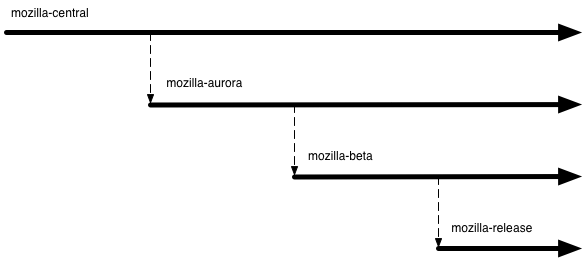
-
mozilla-central
Just like the current repository
-
mozilla-aurora
Stabilize work done on mozilla-central for release
-
mozilla-beta
Fix any issues that come up during the beta validation of the mozilla-aurora stabilization
-
mozilla-release
Repository for code to generate officially released Firefox binaries
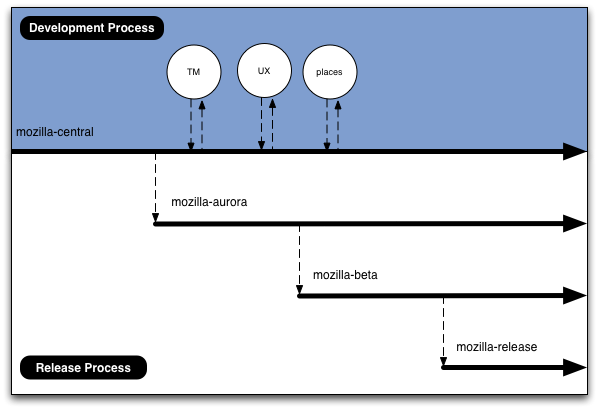
Development vs Release
The repositories can generally be grouped into two overall processes: development and release. Project repositories and mozilla-central are part of the development process. The downstream repositories are part of the release process.
This document mainly covers the release process. Details about project pages, feature tracking, and bug management are out of scope for this proposal and will be discussed soon.
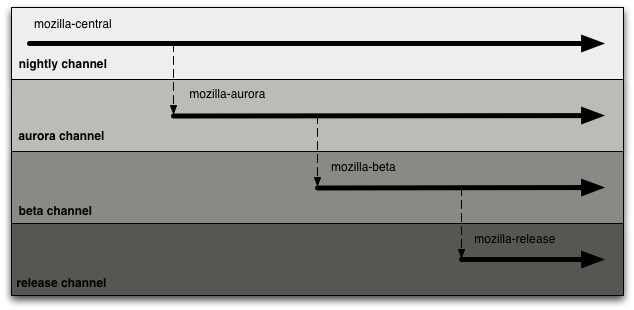
Update Channels
-
nightly
Type of User Mozilla developers and power users willing to risk massive instability to see and test the latest fixes Anticipated Update Rate nightly Signed Yes Branded Not branded as Firefox, uses "Nightly" branding -
aurora
Type of User Power users willing risk instability to see and test the latest fixes. There are higher stability expectations versus nightly Anticipated Update Rate nightly Signed Yes Branded Not branded as Firefox, uses "Firefox Developer Edition" branding -
beta
Type of User Users willing to help test early versions of Firefox during the last round of stability refinement. Anticipated Update Rate twice weekly Signed Yes Branded Branded as Firefox -
release
Type of User Normal Firefox users Anticipated Update Rate 6 weeks Signed Yes Branded Branded as Firefox When a build is offered on this channel it means a new version of Firefox has been officially released.
What Happens Where?
-
mozilla-central
- General development
- Project repository merges
- en-US changes
- Some localization
-
mozilla-aurora
- Preffing off and backing out fixes/features which the central channel exposes as problematic with a wider audience.
- Remaining localizations
- Landing spot fixes to get the product in a shipping state
- Preffing off and backing out fixes/features which were deemed ready but testing determined they in fact were not
-
mozilla-beta
- Fixes for newly-found issues which would prevent a final release
- In extreme cases backouts / pref offs
-
mozilla-release
- Nothing is landed. The repo is just for reference and available for cloning if a rapid response release is needed
Versioning
Firefox Versioning
Unless major issues are discovered with the scheme, this is how builds in the assorted repositories will identify themselves:
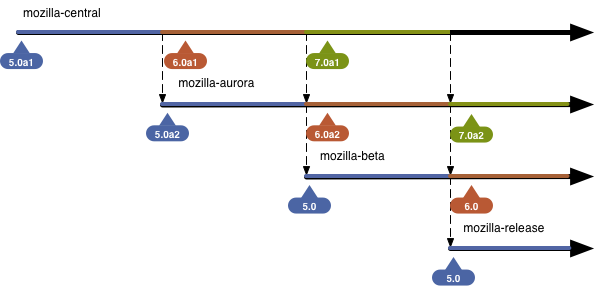
The following considerations are reflected in the versioning scheme:
- No "pre" as there are known issues with sites sniffing builds as Palm Pre devices
- Ease of version comparisons between channels and releases
- Amount of changes required to existing tools and systems
- Ability to identify which channel a user is on from the build
- Beta and release versions should identify as the same version to make sure beta testing is valid and no last-minute issues are found due to a version change
We aren't using "a" and "b" as it would be confusing as it relates to aurora and beta.
Gecko versioning
Gecko versioning will tie into Firefox versioning regardless of the Firefox version scheme above. For Firefox 5, the gecko version will be 5.0, for Firefox 6, 6.0, etc.
Localization
Localization work will be split into similar repositories:
- https://hg.mozilla.org/l10n-central/
- https://hg.mozilla.org/releases/l10n/mozilla-aurora
- https://hg.mozilla.org/releases/l10n/mozilla-beta
- l10n-release
There will be 8 or so locales that track mozilla-central, localizing alongside en-US development. Other locales can track mozilla-central if they would like to as well but they won't be asked to explicitly.
mozilla-central will be string frozen for en-US at the mozilla-central → mozilla-aurora merge point. No en-US string changes will be allowed on mozilla-aurora. The mozilla-central → mozilla-aurora merge date will happen on schedule so the string freeze should not come as a surprise.
For locales that don't track mozilla-central, their work is done in l10n-aurora, which tracks mozilla-aurora. This means most locales have 6 weeks to complete their localizations.
Schedule of Important Milestones
In general, each stage of the process (and activity pertaining to a particular version) lasts for 6 weeks.
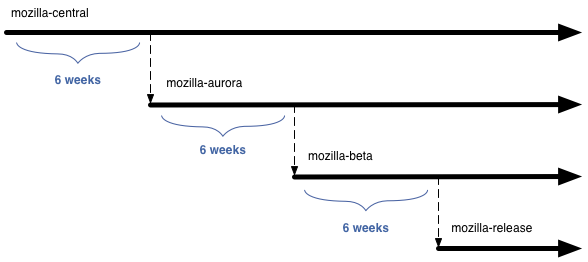
Please do note that chemspills / rapid response updates are not reflected in these schedules and will be dealt with on an as-needed basis.
Cloning Mechanics
The following describes the mozilla-central to mozilla-aurora mechanics. mozilla-aurora to mozilla-beta mechanics follow the same steps, with the exception of tagging (use BETA_BASE_YYYYMMDD), and versioning (strip off the a2 suffix).
- Never delete the aurora repo, we need the history.
- Tag mozilla-central with AURORA_BASE_YYYYMMDD.
hg tag -R mozilla-central AURORA_BASE_`date +%Y%m%d` hg out # review hg push - Tag and close old head on aurora.
hg tag -R mozilla-aurora FIREFOX_AURORA_VERSION hg commit -R mozilla-aurora -r default --close-branch -m 'closing old head' - Push from m-c to a new head on aurora.
hg pull -u -R mozilla-aurora -r AURORA_BASE_`date +%Y%m%d` https://hg.mozilla.org/mozilla-central - Update to the latest aurora
cd mozilla-aurora hg update -C - Bump xpcom version (only for the mozilla-central merge, see bug 653731)
(manually edit xpcom/components/Module.h) - Bump aurora version.
sed -i -e 's/a1/a2/g' browser/config/version.txt js/src/config/milestone.txt config/milestone.txt (for beta 's/a1/a2/g' is 's/a2//g') (manually edit mobile/confvars.sh to bump the version) hg commit -m 'Version bump' - Bump mozilla-central version. (manually edit mobile/confvars.sh to bump the version) (skip this step for mozilla-aurora → mozilla-beta)
- Set aurora branding in browser/confvars.sh (MOZ_BRANDING_DIRECTORY=browser/branding/aurora)
- Set MOZ_MAR_CHANNEL to aurora in browser/confvars.sh (use 'beta' for beta, 'release' for release)
- Human needs to review list of changes since the last AURORA_BASE_YYYYMMDD tag, and figure out which changes to bring forward, and which changes to throw away.
- Use "hg transplant" to take the changes we want to bring forward and bring over to the new head. Make note of the related bugs, and comment in them to notify the relevant stakeholders that they've been transplanted to mozilla-aurora.
- Human needs to resolve any merge conflicts.
Note: some specific files need careful human review of any changes, even if there are no merge conflicts. all.js, firefox.js, configure.in, mozconfig - Human needs to "hg push -f" back to mozilla-aurora
General Observations
Deferring work
No work is deferred from upstream repos to downstream repos. If your feature / change isn't finished on mozilla-central, mozilla-aurora is not the place to fix it up. If there is outstanding work on mozilla-aurora do not plan to fix it in mozilla-beta. The clone / pull dates are published far in advance so there should be ample time to plan. If it's not ready it should be backed out or preffed off. There will be another release in 6-12 weeks for the fix to try to make it in again.
Time-based cloning
Cloning between repos will happen on schedule. Again, consistency is key. Groups will be able to plan and won't need to be intimately involved with the release process to know where fixes are and where fixes should be landed.
The merge between release repos should be automatic
When the time comes to merge upstream release repositories with downstream repositories we are essentially replacing the downstream repository with a copy of the upstream. Because the merge/clone should never fail and it happens on a set schedule it will likely be automated.
Preffing off / backing out happens after the clone
When cloning from mozilla-central to mozilla-aurora the backouts and pref offs take place on the mozilla-aurora repo. This allows mozilla-central to use the complete allotted time for development and utilizes mozilla-aurora's time for convergence.