Stream API
Introduction
The MediaStream interface is used to represent
streams of media data, typically (but not necessarily) of audio and/or
video content, e.g. from a local camera. The data from a
MediaStream object does not necessarily have a
canonical binary form; for example, it could just be "the video currently
coming from the user’s video camera". This allows user agents to
manipulate media streams in whatever fashion is most suitable on the
user’s platform.
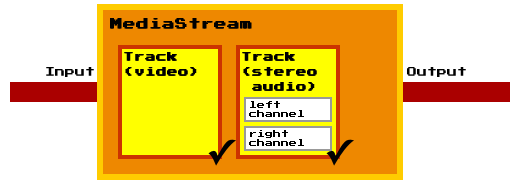
Each MediaStream object can contain zero or more
tracks, in particular audio and video tracks. All tracks in a MediaStream
are intended to be synchronized when rendered. Different MediaStreams do
not need to be synchronized.
Each track in a MediaStream object has a corresponding
MediaStreamTrack object.
A MediaStreamTrack represents content comprising
one or more channels, where the channels have a defined well known
relationship to each other (such as a stereo or 5.1 audio signal).
A channel is the smallest unit considered in this API specification.
A MediaStream object has an input and an output.
The input depends on how the object was created: a
LocalMediaStream object generated by a
getUserMedia()
call (which is described later in this
document), for instance, might take its input from the user’s local
camera. The output of the object controls how the object is used, e.g.
what is saved if the object is written to a file, what is displayed if
the object is used in a video element
Each track in a MediaStream object can be
disabled, meaning that it is muted in the object’s output. All tracks are
initially enabled.
A MediaStream can be finished, indicating
that its inputs have forever stopped providing data.
The output of a MediaStream object MUST correspond
to the tracks in its input. Muted audio tracks MUST be replaced with
silence. Muted video tracks MUST be replaced with blackness.
A new MediaStream object can be created from
existing MediaStreamTrack objects using the
MediaStream() constructor.
The constructor takes two lists of MediaStreamTrack
objects as arguments; one for audio tracks and one for video tracks. The
lists can either be the track lists of another stream, subsets of such
lists, or compositions of MediaStreamTrack objects
from different MediaStream objects.
The ability to duplicate a MediaStream, i.e.
create a new MediaStream object from the track lists
of an existing stream, allows for greater control since separate
MediaStream instances can be manipulated and
consumed individually.
The LocalMediaStream interface is used when the
user agent is generating the stream’s data (e.g. from a camera or
streaming it from a local video file).
When a LocalMediaStream object is being generated
from a local file (as opposed to a live audio/video source), the user
agent SHOULD stream the data from the file in real time, not all at once.
The MediaStream object is also used in contexts outside
getUserMedia, such as [[!WEBRTC10]]. Hence ensuring a
realtime stream in both cases, reduces the ease with which pages can
distinguish live video from pre-recorded video, which can help protect
the user’s privacy.
MediaStream
The MediaStream()
constructor takes two arguments. The arguments are two lists with
MediaStreamTrack objects which will be used to
construct the audio and video track lists of the new
MediaStream object. When the constructor is invoked,
the UA must run the following steps:
-
Let audioTracks be the constructor’s first argument.
-
Let videoTracks be the constructor’s second argument.
-
Let stream be a newly constructed
MediaStreamobject. -
Set stream’s label attribute to a newly generated value.
-
If audioTracks is not null, then run the following sub steps for each element track in audioTracks:
-
If track is of any other kind than "
audio", then throw aSyntaxErrorexception. -
If track has the same underlying source as another element in stream’s audio track list, then abort these steps.
-
Add track to stream’s audio track list.
-
-
If videoTracks is not null, then run the following sub steps for each element track in videoTracks:
-
If track is of any other kind than "
video", then throw aSyntaxErrorexception. -
If track has the same underlying source as another element in stream’s video track list, then abort these steps.
-
Add track to stream’s video track list.
-
A MediaStream can have multiple audio and video
sources (e.g. because the user has multiple microphones, or because the
real source of the stream is a media resource with many media tracks).
The stream represented by a MediaStream thus has zero
or more tracks.
The tracks of a MediaStream are stored in two
track lists represented by MediaStreamTrackList
objects; one for audio tracks and one for video tracks. The two track
lists MUST contain the MediaStreamTrack objects that
correspond to the tracks of the stream. The relative order of all tracks
in a user agent MUST be stable. Tracks that come from a media resource
whose format defines an order MUST be in the order defined by the format;
tracks that come from a media resource whose format does not define an
order MUST be in the relative order in which the tracks are declared in
that media resource. Within these constraints, the order is user-agent
defined.
An object that reads data from the output of a
MediaStream is referred to as a
MediaStream consumer. The list of
MediaStream consumers currently includes the media
elements, PeerConnection (specified in
[[!WEBRTC10]]).
MediaStream consumers must be able to
handle tracks being added and removed. This behavior is specified per
consumer.
A MediaStream object is said to be
finished when all tracks belonging to the stream have
ended. When this happens for any reason other than the
stop() method being
invoked, the user agent MUST queue a task that runs the following
steps:
-
If the object’s
endedattribute has the value true already, then abort these steps. (Thestop()method was probably called just before the stream stopped for other reasons, e.g. the user clicked an in-page stop button and then the user-agent-provided stop button.) -
Set the object’s
endedattribute to true. -
Fire a simple event named
endedat the object.
If the end of the stream was reached due to a user request, the task source for this task is the user interaction task source. Otherwise the task source for this task is the networking task source.
- readonly attribute DOMString label
-
When a
LocalMediaStreamobject is created, the user agent MUST generate a globally unique identifier string, and MUST initialize the object’slabelattribute to that string. Such strings MUST only use characters in the ranges U+0021, U+0023 to U+0027, U+002A to U+002B, U+002D to U+002E, U+0030 to U+0039, U+0041 to U+005A, U+005E to U+007E, and MUST be 36 characters long.When a
MediaStreamis created from another using theMediaStream()constructor, thelabelattribute is initialized to a newly generated value.The
labelattribute MUST return the value to which it was initialized when the object was created. - readonly attribute MediaStreamTrackList audioTracks
-
Returns a
MediaStreamTrackListobject representing the audio tracks that can be enabled and disabled.The
audioTracksattribute MUST return an array host object for objects of typeMediaStreamTrackthat is fixed length and read only. The same object MUST be returned each time the attribute is accessed. - readonly attribute MediaStreamTrackList videoTracks
-
Returns a
MediaStreamTrackListobject representing the video tracks that can be enabled and disabled.The
videoTracksattribute MUST return an array host object for objects of typeMediaStreamTrackthat is fixed length and read only. The same object MUST be returned each time the attribute is accessed. - attribute boolean ended
-
The
MediaStream.endedattribute MUST return true if theMediaStreamhas finished, and false otherwise.When a
MediaStreamobject is created, itsendedattribute MUST be set to false, unless it is being created using theMediaStream()constructor whose arguments are lists ofMediaStreamTrackobjects that are all ended, in which case theMediaStreamobject MUST be created with itsendedattribute set to true. - attribute Function? onended
- This event handler, of type
ended, MUST be supported by all objects implementing theMediaStreaminterface.
LocalMediaStream
Before the web application can access the users media input devices it
must let getUserMedia() create a
LocalMediaStream. Once the application is done using,
e.g., a webcam and a microphone, it may revoke its own access by calling
stop() on the
LocalMediaStream .
A web application may, once it has access to a
LocalMediaStream, use the MediaStream() constructor to construct
additional MediaStream objects. Since a derived
MediaStream object is created from the tracks of an
existing stream, it cannot use any media input devices that have not been
approved by the user.
- void stop()
-
When a
LocalMediaStreamobject’sstop()method is invoked, the user agent MUST queue a task that runs the following steps on every track:-
Let track be the current
MediaStreamTrackobject. -
End track. The track start outputting only silence and/or blackness, as appropriate.
-
Dereference track’s underlying media source.
-
If the reference count of track’s underlying media source is greater than zero, then abort these steps.
-
Permanently stop the generation of data for track’s source. If the data is being generated from a live source (e.g. a microphone or camera), then the user agent SHOULD remove any active "on-air" indicator for that source. If the data is being generated from a prerecorded source (e.g. a video file), any remaining content in the file is ignored.
The task source for the tasks queued for the
stop()method is the DOM manipulation task source. -
MediaStreamTrack
A MediaStreamTrack object represents a media
source in the user agent. Several MediaStreamTrack
objects can represent the same media source, e.g., when the user chooses
the same camera in the UI shown by two consecutive calls to
getUserMedia().
A MediaStreamTrack object can reference its media
source in two ways, either with a strong or a weak reference, depending
on how the track was created. For example, a track in a
MediaStream, derived from a
LocalMediaStream with the MediaStream() constructor, has a weak
reference to a local media source, while a track in a
LocalMediaStream has a strong reference. This means
that a track in a MediaStream, derived from a
LocalMediaStream, will end if there is no
non-ended track in a LocalMediaStream which
references the same local media source.
The concept with strong and weak references to media
sources allows the web application to derive new
MediaStream objects from
LocalMediaStream objects (created via
getUserMedia()),
and still be able to revoke all given permissions with LocalMediaStream.stop().
A MediaStreamTrack object is said to end
when the user agent learns that no more data will ever be forthcoming for
this track.
When a MediaStreamTrack object ends for any reason
(e.g. because the user rescinds the permission for the page to use the
local camera, or because the data comes from a finite file and the file’s
end has been reached and the user has not requested that it be looped, or
because the UA has instructed the track to end for any reason, or because
the reference count of the track’s underlying media source has reached
zero, it is said to be ended. When track instance
track ends for any reason other than stop() method being invoked on the
LocalMediaStream object that represents
track, the user agent MUST queue a task that runs the
following steps:
-
If the track’s
readyStateattribute has the valueENDED(2) already, then abort these steps. -
Set track’s
readyStateattribute toENDED(2). -
Fire a simple event named
endedat the object.
If the end of the stream was reached due to a user request, the event source for this event is the user interaction event source.
- readonly attribute DOMString kind
-
The
MediaStreamTrack.kindattribute MUST return the string "audio" if the object’s corresponding track is or was an audio track, "video" if the corresponding track is or was a video track, and a user-agent defined string otherwise. - readonly attribute DOMString label
-
User agents MAY label audio and video sources (e.g. "Internal microphone" or "External USB Webcam"). The
MediaStreamTrack.labelattribute MUST return the label of the object’s corresponding track, if any. If the corresponding track has or had no label, the attribute MUST instead return the empty string.Thus the
kindandlabelattributes do not change value, even if theMediaStreamTrackobject is disassociated from its corresponding track. - attribute boolean enabled
-
The
MediaStreamTrack.enabledattribute, on getting, MUST return the last value to which it was set. On setting, it MUST be set to the new value, and then, if theMediaStreamTrackobject is still associated with a track, MUST enable the track if the new value is true, and disable it otherwise.Thus, after a
MediaStreamTrackis disassociated from its track, itsenabledattribute still changes value when set, it just doesn’t do anything with that new value. - const unsigned short LIVE = 0
-
The track is active (the track’s underlying media source is making a best-effort attempt to provide data in real time).
The output of a track in the
LIVEstate can be switched on and off with theenabledattribute. - const unsigned short MUTED = 1
-
The track is muted (the track’s underlying media source is temporarily unable to provide data).
A
MediaStreamTrackin aLocalMediaStreammay be muted if the user temporarily revokes the web application’s permission to use a media input device. - const unsigned short ENDED = 2
-
The track has ended (the track’s underlying media source is no longer providing data, and will never provide more data for this track).
For example, a video track in a
LocalMediaStreamfinishes if the user unplugs the USB web camera that acts as the track’s media source. - readonly attribute unsigned short readyState
-
The
readyStateattribute represents the state of the track. It MUST return the value to which the user agent last set it (as defined below). It can have the following values: LIVE, MUTED or ENDED.When a
MediaStreamTrackobject is created, itsreadyStateis eitherLIVE(0) orMUTED(1), depending on the state of the track’s underlying media source. For example, a track in aLocalMediaStream, created withgetUserMedia(), MUST initially have itsreadyStateattribute set toLIVE(1). - attribute Function? onmute
- This event handler, of type
muted, MUST be supported by all objects implementing theMediaStreamTrackinterface. - attribute Function? onunmute
- This event handler, of type
unmuted, MUST be supported by all objects implementing theMediaStreamTrackinterface. - attribute Function? onended
- This event handler, of type
ended, MUST be supported by all objects implementing theMediaStreamTrackinterface.
URL
- static DOMString createObjectURL (MediaStream stream)
-
Mints a Blob URL to refer to the given
MediaStream.When the
createObjectURL()method is called with aMediaStreamargument, the user agent MUST return a unique Blob URL for the givenMediaStream. [[!FILE-API]]For audio and video streams, the data exposed on that stream MUST be in a format supported by the user agent for use in
audioandvideoelements.A Blob URL is the same as what the File API specification calls a Blob URI, except that anything in the definition of that feature that refers to
FileandBlobobjects is hereby extended to also apply toMediaStreamandLocalMediaStreamobjects.
MediaStreamTrackList
A MediaStreamTrackList object’s corresponding
MediaStream refers to the
MediaStream object which the current
MediaStreamTrackList object is a property of.
- readonly attribute unsigned long length
- Returns the number of tracks in the list.
- MediaStreamTrack item(unsigned long index)
- Returns the
MediaStreamTrackobject at the specified index. - void add(MediaStreamTrack track)
-
Adds the given
MediaStreamTrackto thisMediaStreamTrackListaccording to the ordering rules for tracks.When the
add()method is invoked, the user agent MUST run the following steps:-
Let track be the
MediaStreamTrackargument. -
Let stream be the
MediaStreamTrackListobject’s correspondingMediaStreamobject. -
If stream is finished, throw an
INVALID_STATE_ERRexception. -
If track is already in the
MediaStreamTrackList, object’s internal list, then abort these steps. -
Add track to the end of the
MediaStreamTrackListobject’s internal list.
-
- void remove(MediaStreamTrack track)
-
Removes the given
MediaStreamTrackfrom thisMediaStreamTrackList.When the
remove()method is invoked, the user agent MUST run the following steps:-
Let track be the
MediaStreamTrackargument. -
Let stream be the
MediaStreamTrackListobject’s correspondingMediaStreamobject. -
If stream is finished, throw an
INVALID_STATE_ERRexception. -
If track is not in the
MediaStreamTrackList, object’s internal list, then abort these steps. -
Remove track from the
MediaStreamTrackListobject’s internal list.
-
- attribute Function? onaddtrack
- This event handler, of type
addtrack, MUST be supported by all objects implementing theMediaStreamTrackListinterface. - attribute Function? onremovetrack
- This event handler, of type
removetrack, MUST be supported by all objects implementing theMediaStreamTrackListinterface.