Scanner Pipeline
The scanner pipeline is a security feature that lets external services, called scanners, analyze add-ons submitted to AMO and act on what they find.
Overview
Something happens on AMO, e.g. a new version is created. This is a scanner webhook event.
AMO calls every scanner webhook subscribed to that event.
Each scanner returns its results, synchronously or asynchronously, and AMO stores them as a scanner result.
The rules matched by a scanner can trigger scanner actions, e.g. flagging the version for human review.
Some events block auto-approval: a version is not auto-approved until the scanners subscribed to them have sent their results. See Waiting for scanner results.
Scanners can also push results on their own, without AMO calling them first.
Concepts
Scanner Results
A scanner result stores the output returned by a scanner, and it might be tied to a webhook event.
Scanners can return a list of matched rules. When these rules exist as scanner rules on AMO, it becomes possible to execute scanner actions. This is a core concept of the scanner pipeline, which essentially allows a scanner to make a change to an add-on version.
Scanner Rules
A scanner rule allows scanners to trigger an action.
Unknown rules reported by scanner webhooks are created automatically (active, with no workflow action and no policy). Existing rules are left untouched.
Scanner Actions
A scanner action is some logic that can be applied to an add-on version. Each scanner rule can be configured with two kinds of actions:
a workflow action, e.g. flagging a version for human review. These actions are defined in
src/olympia/scanners/actions.py. When several matched rules have one, only the most severe is executed.a policy, from which AMO derives an enforcement action (e.g. disabling the add-on) and records it as a content decision. When several policies are hit, only the most aggressive enforcement action is executed.
Actions are executed by ScannerResult.run_actions(), which is called:
by the auto-approval cron job, once per version, over every rule matched on that version;
when a scanner pushes a result, over the rules of that result only;
when narc re-scans a version and finds new matches, over every rule matched on that version.
Writing a scanner
Adding a scanner webhook
Scanner webhooks must be registered in the AMO (django) admin. The following information must be provided:
Name: the name of the scanner
URL: the full URL of the scanner, which will receive the events
API key: the secret key sent to the scanner to authenticate AMO requests
Add one or more Scanner Webhook Events.
Note
Upon creation, a service account will be automatically generated for this
scanner webhook. The service account is automatically granted the
Scanners:PatchResults permission to submit its results
asynchronously.
A service account is needed to authenticate the scanner against the AMO API. Make sure to add the relevant permissions to it, depending on what the scanner needs to access.
Creating a new scanner
We provide a library to quickly develop new scanners written with Node.js: addons-scanner-utils.
Start by installing the dependencies using npm:
npm add express safe-compare addons-scanner-utils
Next, create an index.js containing the code of the scanner:
import { createExpressApp } from "addons-scanner-utils";

import pkg from "./package.json" with { type: "json" };

const handler = (req, res) => {
  console.log({ data: req.body });

  // Option 1: Synchronous response
  res.json({ version: pkg.version, matchedRules: [] });

  // Option 2: Asynchronous response (for long-running scans)
  // res.status(202).json({ ok: true });
  // // Perform scanning asynchronously and later send results with:
  // //
  // // await patchScannerResult(req.body.scanner_result_url, {
  // //   results: { version: pkg.version, matchedRules: [] },
  // // });
};

const app = createExpressApp({
  apiKeyEnvVarName: "NEW_SCANNER_API_KEY",
})(handler);

const port = process.env.PORT || 20000;
app.listen(port, () => {
  console.log(`new-scanner is running on port ${port}`);
});
Start the new scanner with node:
NEW_SCANNER_API_KEY=new-scanner-api-key node index.js
new-scanner is running on port 20000
Register the new scanner on AMO:
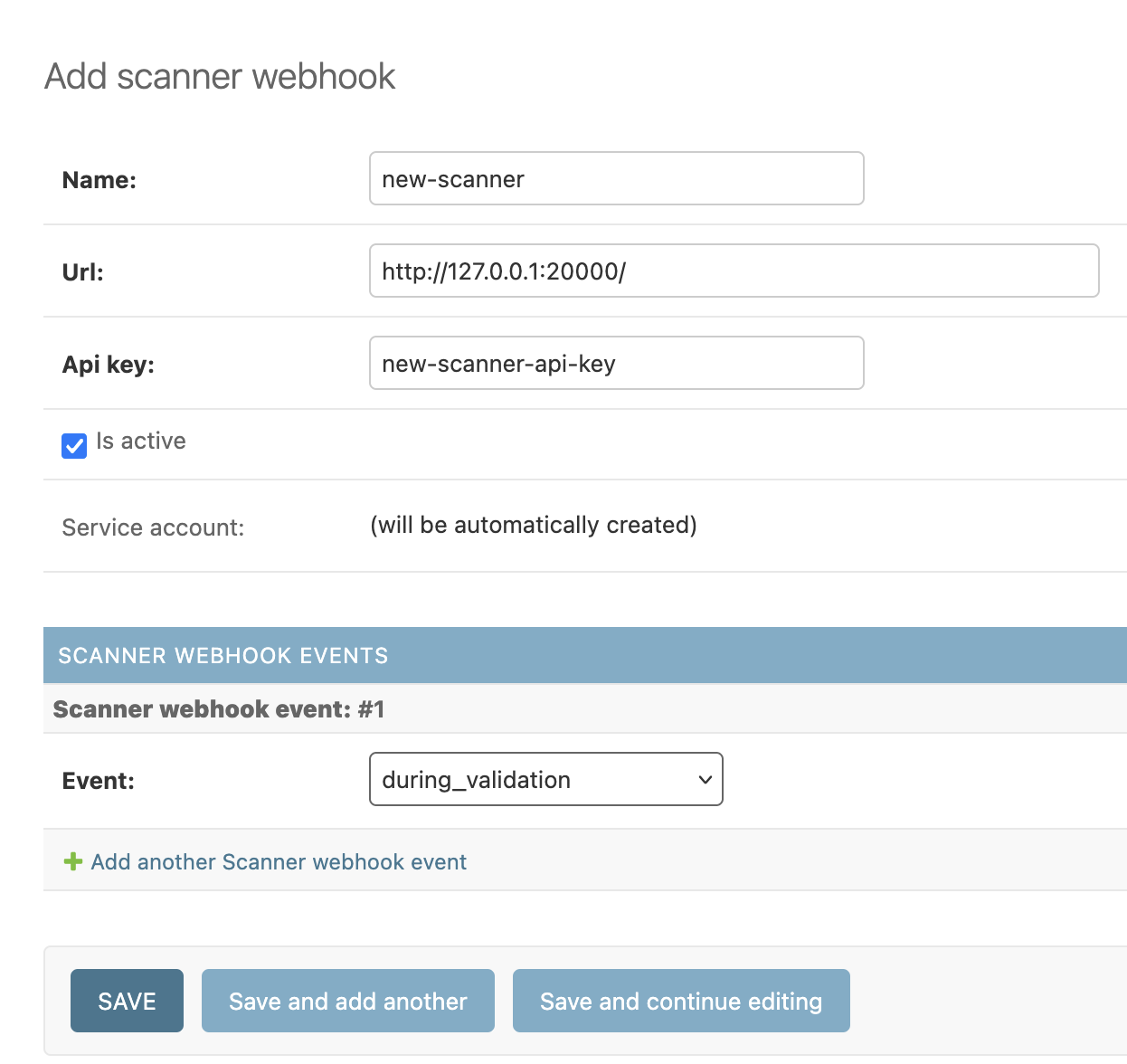
When the new scanner is created, the Django admin will display the JWT keys for the service account bound to this new scanner. Keep these credentials safe.

When uploading a new file, you should see the following in the console:
{
  data: {
    download_url: "http://olympia.test/uploads/file/fa7868396b7e44ef8a0711f608f534f7/?access_token=w0Tl7qmJqBMQ4gtitKbcdKozulWVQWhkU0wEA10N",
    event: "during_validation",
    scanner_result_url: "http://olympia.test/api/v5/scanner/results/123/"
  }
}
The rest of this page describes what AMO sends to scanners and what they are expected to send back.
Scanner Webhooks
A scanner webhook is essentially a URL to a service subscribed to events that occur on AMO. These webhooks are registered in the AMO (django) admin.
When a scanner webhook event occurs, AMO will send an HTTP request to each webhook subscribed to this event. The payload sent to the webhook depends on the event, but always includes:
event: the name of the eventscanner_result_url: the URL of the scanner result that a scanner can use to asynchronously send its results
Each service registered as a scanner webhook must be protected with a shared secret (api) key. Read the authentication section for more information.
Every webhook call includes an X-AMO-Request-ID header carrying a unique id
generated for each webhook call. Scanners are encouraged to log it and include
it in their own logs so a single webhook call can be correlated across AMO and
the scanner service.
Authentication
Authenticating incoming webhook calls
Scanners must verify the incoming requests using the Authorization header and
not allow unauthenticated requests. For every webhook call, AMO will send this
header using the API key defined in the Django admin as follows:
Authorization: HMAC-SHA256 <hexdigest>
<hexdigest> is the HMAC-SHA256 hex digest of the request’s body with
the API key used as the secret key. Make sure to hash the raw request’s
body.
Authenticating asynchronous result submissions
When sending results asynchronously via PATCH to the scanner_result_url,
scanners must authenticate using JWT credentials. Each scanner webhook has an
automatically created service account, and the JWT keys for this account are
displayed in the Django admin after creating the webhook.
Use the JWT key and secret to generate a JWT token and include it in the
Authorization header when making PATCH requests to submit results
asynchronously.
API responses
Scanners can choose to return results synchronously, asynchronously, or skip processing the event entirely. The HTTP status code returned by the scanner determines how AMO handles the response:
Status code |
Meaning |
|---|---|
|
Results returned synchronously in the response body |
|
Same as |
|
Scanner acknowledged the event and will send results asynchronously |
|
Scanner skipped the event and is considered done with it |
Any other status code, or a response body containing an error field, is
treated as a failure: no results are stored and, for events blocking
auto-approval, the scanner webhook is called again
later.
On a connection error, a timeout, or a 50x status code, AMO immediately
retries the call once before treating it as a failure. Long-running scanners
should respond asynchronously.
Synchronous response
Scanners can return a JSON response immediately that contains the following fields:
version: the scanner versionmatchedRules: an array of matched rule identifiers (string). This field is required, even when empty: a scanner result without it is considered incomplete (see delivery retries)annotations(optional): a map of rule name to a list of annotation objects. See Annotations for details.
Asynchronous response
Scanners can also return a quick acknowledgment response and send their results
later using the scanner_result_url provided in the webhook payload. This is
useful for long-running scans.
To send results asynchronously:
The scanner receives a webhook event with a
scanner_result_urlin the payloadThe scanner returns a quick acknowledgment (e.g., HTTP 202 Accepted with body
{}or{"ok": true})The scanner performs its analysis
The scanner sends a PATCH request to the
scanner_result_urlwith the results
The acknowledgment body must be valid JSON: an empty body is treated as a
failure. It must not contain matchedRules either, otherwise AMO considers it
the final result.
The PATCH request must be authenticated using the service account JWT
credentials and include a JSON body with a results
field:
{
  "results": {
    "version": "1.0.0",
    "matchedRules": []
  }
}
The results field has the same structure as a synchronous
response. Both version and matchedRules are
required, every key in annotations must be listed in matchedRules, and no
field other than results is allowed in the request body.
Status code |
Meaning |
|---|---|
|
Results stored successfully |
|
Validation error (missing fields, extra fields, unknown annotation keys) |
|
No scanner result with this id bound to the authenticated service account |
|
Results have already been sent for this scanner result |
Skipping an event
Scanners can use the 204 No Content HTTP status code to indicate that they
intentionally skipped the event (e.g., the event is not relevant for this
scanner). The results of the scanner result associated with this event are
left empty (null), and the scanner is considered done with the event.
Annotations
Scanners can attach human-readable annotations to matched rules by providing an
annotations object in the response. The annotations object is a map keyed
by rule name, where each value is a list of annotation objects. Each annotation
object may include a message (string), an optional file path (string),
and any other arbitrary fields.
{
  "version": "1.0.0",
  "matchedRules": ["RULE_1", "ANNOTATIONS"],
  "annotations": {
    "RULE_1": [
      {
        "file": "background.js",
        "message": "Obfuscated code detected.",
        "line": 42,
        "description": "Detects obfuscated code.",
        "ticket": "https://example.com/tickets/1234"
      },
      {
        "message": "This version contains potentially malicious code.",
        "description": "Detects obfuscated code.",
        "ticket": "https://example.com/tickets/1234"
      }
    ],
    "ANNOTATIONS": [
      {
        "message": "This extension collects browsing history without disclosure."
      }
    ]
  }
}
Rules used as annotation keys must be listed in matchedRules. When there is
no specific rule to associate with an annotation, use ANNOTATIONS as the rule
name.
Each annotation of a matched rule is expected to include the following fields:
description: a human-readable description of the ruleticket: a link to the ticket associated with the rule
Note
Each annotated rule must be an active scanner rule on AMO for the annotation to be displayed.
Scanner Webhook Events
during_validation
Warning
This event is only available for legacy purposes and shouldn’t be used anymore.
In most cases, on_version_created is a better alternative.
This event occurs when a file upload is being validated, which typically happens when a new version is being submitted to AMO. This is called near the end of the validation chain.
The payload sent looks like this. Assuming correct permissions, the URL in
download_url allows the services notified for this event to download the (raw)
uploaded file. The scanner_result_url allows the scanner to send results
asynchronously.
{
  "download_url": "http://olympia.test/uploads/file/42",
  "event": "during_validation",
  "scanner_result_url": "http://olympia.test/api/v5/scanner/results/123/"
}
on_source_code_uploaded
This event occurs when source code is uploaded, e.g., in DevHub.
The payload sent looks like this:
{
  "addon": {
    "status": "public",
    "is_experimental": false,
    "description": null,
    "homepage": null,
    "icons": {
      "32": "http://olympia.test/static-server/img/addon-icons/default-32.png",
      "64": "http://olympia.test/static-server/img/addon-icons/default-64.png",
      "128": "http://olympia.test/static-server/img/addon-icons/default-128.png"
    },
    "authors": [
      {
        "id": 11181,
        "name": "Firefox user 11181",
        "url": "http://olympia.test/user/11181/",
        "username": "some-username"
      }
    ],
    "id": 88,
    "requires_payment": false,
    "tags": [],
    "url": "http://olympia.test/api/v5/addons/addon/88/",
    "weekly_downloads": 1122,
    "ratings": {
      "average": 0.0,
      "bayesian_average": 0.0,
      "count": 0,
      "text_count": 0
    },
    "default_locale": "en-US",
    "summary": {
      "en-US": "Summary for My Extension"
    },
    "guid": "{887ea080-e5f1-4363-99d3-f90fb8594967}",
    "type": "extension",
    "categories": ["photos-music-videos"],
    "is_featured": false,
    "is_source_public": false,
    "is_disabled": false,
    "promoted": [],
    "slug": "my-extension-slug",
    "support_url": null,
    "support_email": null,
    "has_privacy_policy": false,
    "last_updated": "2026-03-03T13:03:13Z",
    "created": "2011-07-13T15:38:13Z",
    "previews": [],
    "developer_comments": null,
    "has_eula": false,
    "name": {
      "en-US": "My Extension"
    },
    "is_noindexed": false,
    "average_daily_users": 1372
  },
  "version": {
    "release_notes": null,
    "version": "12305.51787.17236.47177",
    "id": 90,
    "is_strict_compatibility_enabled": false,
    "license": {
      "id": 8,
      "is_custom": false,
      "name": {
        "en-US": "Mozilla Public License 2.0"
      },
      "slug": "MPL-2.0",
      "text": null,
      "url": "https://www.mozilla.org/MPL/2.0/"
    },
    "channel": "listed",
    "reviewed": null,
    "compatibility": {
      "firefox": {
        "min": "4.0.99",
        "max": "5.0.99"
      }
    },
    "file": {
      "id": 90,
      "created": "2026-03-03T13:03:13Z",
      "hash": "",
      "is_restart_required": false,
      "is_webextension": true,
      "is_mozilla_signed_extension": false,
      "platform": "all",
      "size": 0,
      "status": "public",
      "url": "http://olympia.test/downloads/file/90/",
      "permissions": [],
      "optional_permissions": [],
      "host_permissions": [],
      "data_collection_permissions": [],
      "optional_data_collection_permissions": []
    },
    "url": "http://olympia.test/api/v5/addons/addon/88/versions/90/",
    "download_source_url": "http://olympia.test/downloads/source/90"
  },
  "activity_log_id": 2170,
  "event": "on_source_code_uploaded",
  "scanner_result_url": "http://olympia.test/api/v5/scanner/results/124/"
}
Note
The addon object property is similar to the API add-on detail
object but some fields differ (e.g., URL fields are API
URLs rather than website URLs, and there is no current_version field).
The version object property is also similar to the API version detail
object.
on_version_created
This event occurs when a new version is created.
The payload sent looks like this:
{
  "addon": {
    // Similar to the `on_source_code_uploaded` event.
  },
  "version": {
    // Similar to the `on_source_code_uploaded` event.

    // `download_source_url` can be `null` when no source code was provided for
    // the version.
    "download_source_url": null
  },
  "event": "on_version_created",
  "scanner_result_url": "http://olympia.test/api/v5/scanner/results/125/"
}
on_listing_changed
This event occurs when the listing of an add-on changes. The reason field
indicates what changed:
metadata: the name or summary of the add-on changedauthors: a new author was added (besides the first one), or an author changed their username or display name
The version is the latest non-rejected listed version of the add-on. Add-ons
without such a version don’t trigger this event.
The payload sent looks like this:
{
  "addon": {
    // Similar to the `on_version_created` event.
  },
  "version": {
    // Similar to the `on_version_created` event.
  },
  "reason": "metadata",
  "event": "on_listing_changed",
  "scanner_result_url": "http://olympia.test/api/v5/scanner/results/126/"
}
on_version_scanned
This event occurs once every scanner listening to a predefined set of events has returned its results for the version. It is meant for scanners that need to make a decision informed by what the other scanners found.
In addition to the usual addon and version properties, the payload contains a
scanner_results object. It has one property per aggregated event, each mapping
the name of a scanner listening to that event to the results it returned. A
null value means that scanner skipped the event.
A scanner listening to both aggregated events appears under both, so its two sets of results remain distinguishable.
{
  "addon": {
    // Similar to the `on_version_created` event.
  },
  "version": {
    // Similar to the `on_version_created` event.
  },
  "scanner_results": {
    "during_validation": {
      "some-scanner": {
        "version": "1.0",
        "matchedRules": ["SOME_RULE"],
        "annotations": {}
      }
    },
    "on_version_created": {
      "some-scanner": {
        "version": "1.0",
        "matchedRules": [],
        "annotations": {}
      },
      "some-other-scanner": null
    }
  },
  "event": "on_version_scanned",
  "scanner_result_url": "http://olympia.test/api/v5/scanner/results/127/"
}
Warning
scanner_results reports every result AMO holds for an aggregated event, which
is not the same set as the scanners currently subscribed to it. A scanner that
subscribed after the version was created is missing entirely, because AMO
never called it; conversely, a scanner whose webhook has since been deactivated
is still reported, because its results had already been collected. Don’t assume
the object lists every scanner currently subscribed; look up the scanners you
care about by name and handle their absence.
This event blocks auto-approval like the events it aggregates, so the version is
not auto-approved until the scanners listening to it have answered as well. When
AMO gave up on one of the aggregated scanners, the event is still sent, with the
SCANNER_RESULTS_MISSING rule in place of that scanner’s
results.
Results pushed by a scanner are not part of the payload, and pushing results does not trigger this event.
on_version_entered_review_queue
This event occurs when a version enters a review queue.
The payload sent looks like this:
{
  "addon": {
    // Similar to the `on_version_created` event.
  },
  "version": {
    // Similar to the `on_version_created` event.
  },
  // When the version is due for review.
  "due_date": "2026-10-12T14:00:00",
  // Active "needs human review" reasons on the version. This can be empty
  // because a version can be in a queue for other reasons.
  "needs_human_review_reasons": ["scanner_action"],
  "event": "on_version_entered_review_queue",
  "scanner_result_url": "http://olympia.test/api/v5/scanner/results/128/"
}
Pushing results
In addition to responding to AMO-initiated webhook events, a scanner can proactively push results for an existing version using the push endpoint. This is useful for scanners that operate on their own schedule or that re-scan versions independently of AMO events.
Unlike the other events, push is never sent by AMO: subscribing a scanner
webhook to it is what allows the scanner to push results.
Request
Scanners can push results by sending a POST request to /api/v5/scanner/results/
using their JWT service account credentials. The service account must have the
Scanners:PushResults permission. The request body must include the version to
attach results to and the scan results:
{
  "version_id": 123,
  "results": {
    "version": "1.0.0",
    "matchedRules": ["RULE_1"],
    "annotations": {}
  }
}
Field |
Type |
Description |
|---|---|---|
|
integer |
The primary key of the add-on version to attach results to |
|
object |
Same structure as a synchronous response |
Responses
Status code |
Meaning |
|---|---|
|
Result created successfully |
|
Validation error (unknown version, missing fields, extra fields) |
|
Missing or invalid JWT credentials |
|
Not a scanner service account, or no active webhook with a |
|
One or more of the |
A push is rejected with 409 Conflict when any rule in matchedRules has
already been pushed for the same version via the same webhook. Only active
scanner rules are considered for this check.
Actions
When a pushed result matches at least one scanner rule, the actions of those rules are executed asynchronously.
Only the rules of the result that was just pushed are considered, unlike the auto-approval flow which considers every rule matched on the version. A rule matched earlier by another scanner is therefore not re-run, and the policy it may be attached to is not enforced a second time.
Waiting for scanner results
A version is not auto-approved until every scanner blocking its auto-approval
is done with it, i.e. it skipped the event or sent its
matchedRules.
Delivery retries
When some results are still missing two hours after the version was created, the
wait_for_scanner_results task calls the corresponding scanner webhooks again
with the same payload, and keeps doing so every two hours, up to 12 times. The
last retry therefore happens 24 hours after the version was created, and AMO
gives up two hours later if results are still missing.
AMO waits in two steps, each with a budget of its own: first for the results
on_version_scanned aggregates, then for
on_version_scanned itself, which cannot be sent before they are all in. A
scanner listening to on_version_scanned therefore gets the same schedule,
counted from the moment the event was sent to it.
Once the retries are exhausted, or when the payload can no longer be rebuilt
(e.g., the uploaded file a during_validation payload points to is gone), AMO
records artificial results matching the special SCANNER_RESULTS_MISSING
rule:
{
  "matchedRules": ["SCANNER_RESULTS_MISSING"]
}
The version then stops waiting on that scanner, and whichever action is configured on that rule applies. This rule is created by a migration with no workflow action and no policy, so by default the version only stops waiting.
Good to know
Saving a scanner webhook in the admin, even without changing anything, stops every version created before that save from waiting on its results (they may still wait on other scanners). We only wait on scanner webhooks that haven’t been modified after the version was created, so that enabling a scanner doesn’t block versions that were uploaded before. The version gets auto-approved (or not) on the next run of the auto-approval cron job, and the pipeline stops calling the scanner webhook again for it.
In case of emergency, the
disable-check-is-waiting-on-scannerswaffle switch makes versions stop waiting on scanners altogether: the auto-approval cron job runs the scanner actions with whatever results are available and attempts to auto-approve the versions right away. This switch isn’t created by a migration, so it has to be added in the admin first.
Adding a new event
Add a constant for the new event in
src/olympia/constants/scanners.py. The name must start withWEBHOOK_. Make sure the new constant is registered inWEBHOOK_EVENTS(in the same file).In a
tasks.pyfile, create a Celery task that callscall_webhooks(event_id, payload, upload=None, version=None, activity_log=None). Make sure this task is assigned to a queue insrc/olympia/lib/settings_base.py.Invoke this Celery task (with
.delay()) where the event occurs in the code.If versions should not be auto-approved until the scanners subscribed to the new event are done, add the event to
WEBHOOK_EVENTS_BLOCKING_AUTO_APPROVALand makebuild_webhook_payload()return its payload, so that the webhooks can be called again.Update this documentation page.